> For the complete documentation index, see [llms.txt](https://docs.solarvis.co/llms.txt). Markdown versions of documentation pages are available by appending `.md` to page URLs; this page is available as [Markdown](https://docs.solarvis.co/project-design/create-a-project/summary.md).
# Summary & Offer
This page allows you to review and validate the complete technical, energy, battery, and financial results of the project before creating or sending the proposal.
## Purpose of This Page
The Summary & Offer page is the final checkpoint of the project workflow. It consolidates outputs from all previous steps and presents them in a customer-ready format. This page is used to confirm design accuracy, explain system performance, validate financial outcomes, and generate the final proposal.
{% hint style="info" %}
No manual input is required on this page. All results are recalculated automatically whenever a change is made elsewhere in the project.
{% endhint %}
## What You Can Do Here
On this page, you can:
* Review the full system configuration and capacities
* Verify panel, inverter, and battery selections
* Inspect layout images and 3D design visuals
* Understand how energy flows between the solar, the battery, and the grid
* Analyze energy production, consumption, and self-consumption
* Review system losses and performance assumptions
* Evaluate the battery contribution that you arranged
* Review investment cost, savings, and payback period
* Validate annual bill savings and cash flow impact
* Review the full bill of materials and pricing
* Download hourly simulation results for detailed analysis
* Print or send the proposal to the customer
{% embed url="" %}
## Step-by-Step Overview
This section helps you review the project summary and final checks before sending the offer.
### Download Hourly Simulation
The Download Hourly Simulation option is also available on the Summary page, allowing you to export system performance data without returning to the **Panel Placement & Inverter Selection** page.
This provides quick access to detailed hourly results based on the finalized system configuration shown in the summary.
To download the hourly simulation file:
* Click Download Hourly Simulation from the top right section of the page
The exported file includes the same hourly simulation dataset generated from the current project, reflecting:
* System production values
* Consumption and energy flow data
* Battery and heat pump behavior if configured
{% hint style="info" %}
This allows you to directly use simulation results for analysis, reporting, or sharing with stakeholders after completing the system design.
{% endhint %}
### Print Offer
Clicking the **Print Offer** opens the proposal in a dedicated proposal view. A unique proposal link is generated automatically. From there, the proposal can be previewed, customized, changed the quote template & settings, and downloaded as a PDF.
#### **What happens when you click Print Offer**
* The proposal opens in a full-page preview mode
* The proposal layout is generated based on the selected quote template and quote settings
#### **What you can do in the Print Offer view**
* Preview the complete proposal exactly as the customer will receive it
* Switch between available quote templates, such as On-Grid or Off-Grid, and different language options
* Customize all sections while previewing the proposal and see changes applied immediately
#### **'Save as PDF' or 'Send Offer' Buttons**
After clicking the **Print Offer** button, two options will appear: **Save as PDF** and **Send Offer**.
1. **Save as PDF**
Click the **Save as PDF** button to download the proposal as a PDF file.
{% hint style="info" %}
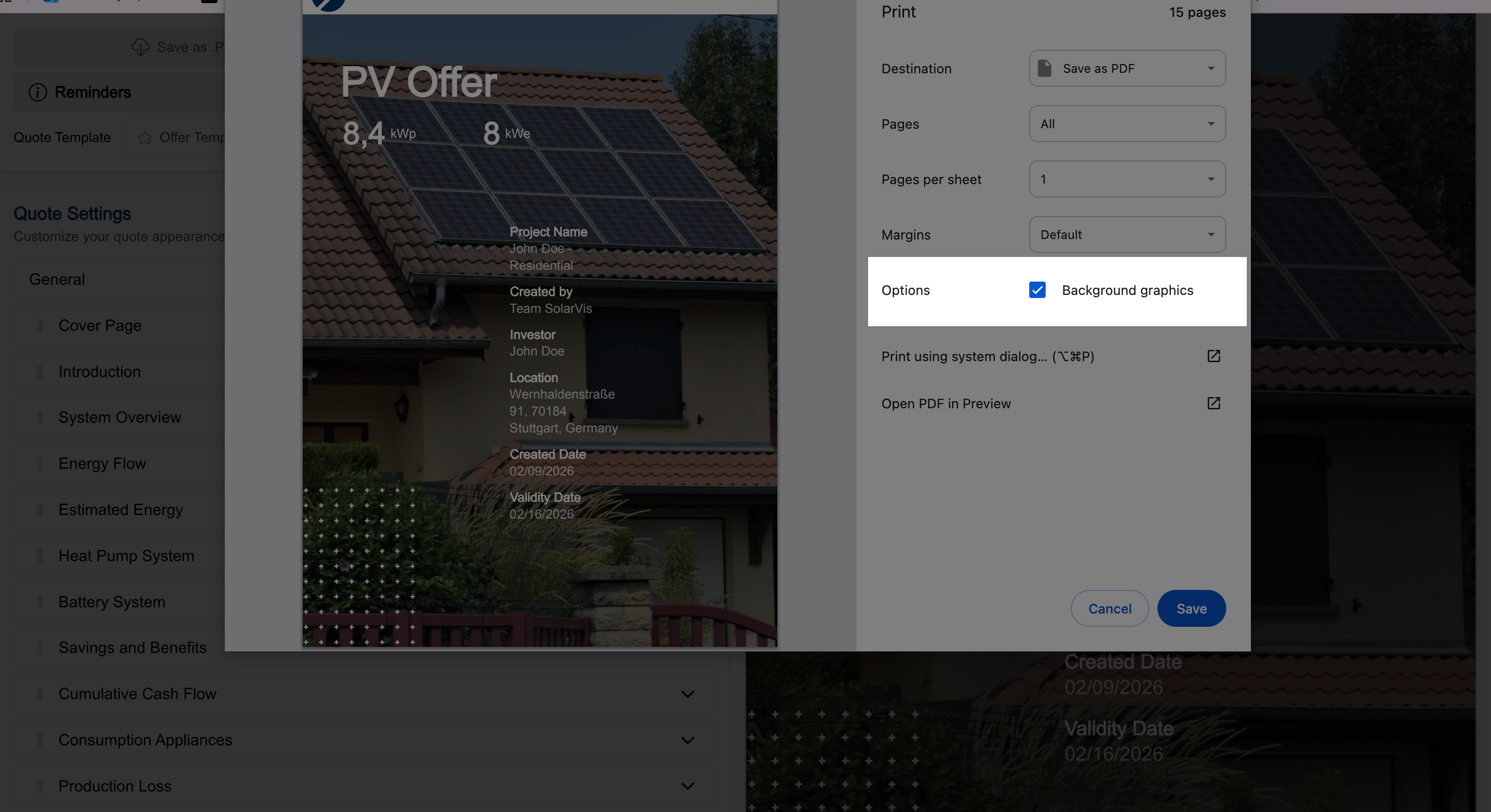
When downloading the proposal **using Google Chrome**, select **the** **Background Graphics** option to include graphics in the saved file.
 {% endhint %}
2. **Send Offer**
Click the **Send Offer** button to open the Send Proposal modal. From this modal, you can choose how the proposal will be delivered to the customer.
You can use solarVis' hosted delivery methods or your own communication channels.
**SolarVis Hosted Methods**
* **Send via Phone**
SolarVis sends an SMS to the customer containing a secure proposal link.
* **Send via Email**
SolarVis sends the proposal link directly to the customer’s email address.
{% hint style="info" %}
SolarVis provides different message and email templates, which you can change whichever you want and preview before sending.
{% endhint %}
After selecting one or both options, click Send Proposal to deliver the offer.
**Your Own Methods**
* **Get Link of Proposal**
Copies a shareable proposal link that you can send manually.
* **Send via WhatsApp**
Opens WhatsApp with the proposal link ready to send to the customer.
* **Send via Email App**
Opens your default email application with the proposal link included.
### Project Header and Controls
At the top of the page, you can see the project name, customer name, project location, created date, and company logo to review all the introduction information.
#### System Overview
This section summarizes the core technical configuration of the system, including:
* Total number of panels
* Inverter count
* Whether the battery and heat pump are included, and the capacity
* Installed DC power
* Installed AC power
It allows you to quickly confirm that the designed system matches the intended project scope.
#### Design Overview
The Design Overview displays visual representations of the project layout:
* Main system design image
* Additional views generated from the 3D model
These visuals are used directly in proposals to clearly explain panel placement, roof usage, and system layout to the customer.
#### Energy Flow
This section explains how energy moves through the system over the course of a year, using a flow diagram between **Solar PV**, the **Grid**, the **Site**, and the **Battery**.
An accompanying **Energy Flows** table lists each flow with its yearly value and a short description:
* Solar energy delivered to the site, the grid, and the battery
* Grid energy supplied to the site and used to charge the battery
* Battery energy supplied to the site and sold back to the grid
This makes it easy to see how production, storage, and grid exchange balance out across the year.
#### Estimated Production and Consumption
This section provides the following details:
* Annual totals for production, consumption, and self-consumption
* Monthly breakdowns displayed in tables and charts
These visuals help explain seasonal variations and show how much solar energy is used directly on site versus exported to the grid.
#### Estimated System Losses
This section details the performance losses applied in the system calculation, including:
* Irradiation losses
* DC losses
* AC losses
These values explain why the final AC energy output differs from the theoretical solar potential.
#### MCS Shading Analysis (if applicable)
For UK projects assessed with the MCS shading standard, this card presents the MGD-005 shade evaluation after the MCS shading analysis has been run:
* One 84-segment sunpath diagram per array, with the shaded segments marked and a minimap of the array's panels
* A table with each array's orientation, inclination, module count, installed kWp, shaded segments, and shade factor
* The kWp-weighted system shade factor
Each sky segment blocked by an obstruction reduces the array's output by 1%, so the shade factor equals 1 − 0.01 × shaded segments.
#### Heat Pump Systems (if applicable)
If a heat pump system is included, this section summarizes its impact on the project.
You can review the following points in this section:
* Heating and cooling efficiency (COP values)
* Heat load coverage rate
* Energy source distribution for heating demand
#### Battery Systems (if applicable)
If a battery system is included, this section summarizes its impact on the project.
It can be reviewed the following items in this section:
* Average self-consumption increase
* Backup capacity and estimated backup time
* Battery contribution to energy bills
#### Financial Overview
The Financial Overview presents the key economic results of the project, including:
* Total investment cost
* Annual maintenance and repair cost
* First-year savings
* Return on investment
All values are calculated automatically based on system performance, pricing, and regulatory assumptions.
#### Annual Bill Savings
This section compares electricity bills:
* Before solar installation
* After solar installation
* After solar with battery (if applicable)
Monthly savings and coverage rates help clearly demonstrate the financial benefits of the system.
#### Materials
The Materials section lists all components included in the project.
For each item, this section presents the following details:
* Product name
* Unit type
* Unit price
* Quantity
* Total cost
This ensures pricing transparency and aligns the proposal with the configured bill of materials.
***
## Related Pages
* [Project Details Page](/project-design/create-a-project/project-details.md)
* [Heat Pump Page](/project-design/create-a-project/heat-pump.md)
* [Battery Page](/project-design/create-a-project/battery.md)
* [Bill of Materials Page](/project-design/create-a-project/bill-of-materials-bom.md)
* [Panel Placement & Inverter Selection Page](/project-design/create-a-project/panel-placement-and-inverter-selection.md)
[Feel free to contact us](https://www.solarvis.co/en/company/contact) if you need further assistance.
---
# Agent Instructions
This documentation is published with GitBook. GitBook is the documentation platform designed so that both humans and AI agents can read, navigate, and reason over technical content effectively. Learn more at gitbook.com.
## Querying This Documentation
If you need additional information that is not directly available in this page, you can query the documentation dynamically by asking a question.
Perform an HTTP GET request on the current page URL with the `ask` query parameter, and the optional `goal` query parameter:
```
GET https://docs.solarvis.co/project-design/create-a-project/summary.md?ask=&goal=
```
`ask` is the immediate question: it should be specific, self-contained, and written in natural language.
`goal` is optional and describes the broader end goal you are ultimately trying to accomplish on behalf of the user. GitBook uses it to tailor the answer towards what is most useful for that goal.
The response will contain a direct answer to the question and relevant excerpts and sources from the documentation.
Use this mechanism when the answer is not explicitly present in the current page, you need clarification or additional context, or you want to retrieve related documentation sections.
{% endhint %}
2. **Send Offer**
Click the **Send Offer** button to open the Send Proposal modal. From this modal, you can choose how the proposal will be delivered to the customer.
You can use solarVis' hosted delivery methods or your own communication channels.
**SolarVis Hosted Methods**
* **Send via Phone**
SolarVis sends an SMS to the customer containing a secure proposal link.
* **Send via Email**
SolarVis sends the proposal link directly to the customer’s email address.
{% hint style="info" %}
SolarVis provides different message and email templates, which you can change whichever you want and preview before sending.
{% endhint %}
After selecting one or both options, click Send Proposal to deliver the offer.
**Your Own Methods**
* **Get Link of Proposal**
Copies a shareable proposal link that you can send manually.
* **Send via WhatsApp**
Opens WhatsApp with the proposal link ready to send to the customer.
* **Send via Email App**
Opens your default email application with the proposal link included.
### Project Header and Controls
At the top of the page, you can see the project name, customer name, project location, created date, and company logo to review all the introduction information.
#### System Overview
This section summarizes the core technical configuration of the system, including:
* Total number of panels
* Inverter count
* Whether the battery and heat pump are included, and the capacity
* Installed DC power
* Installed AC power
It allows you to quickly confirm that the designed system matches the intended project scope.
#### Design Overview
The Design Overview displays visual representations of the project layout:
* Main system design image
* Additional views generated from the 3D model
These visuals are used directly in proposals to clearly explain panel placement, roof usage, and system layout to the customer.
#### Energy Flow
This section explains how energy moves through the system over the course of a year, using a flow diagram between **Solar PV**, the **Grid**, the **Site**, and the **Battery**.
An accompanying **Energy Flows** table lists each flow with its yearly value and a short description:
* Solar energy delivered to the site, the grid, and the battery
* Grid energy supplied to the site and used to charge the battery
* Battery energy supplied to the site and sold back to the grid
This makes it easy to see how production, storage, and grid exchange balance out across the year.
#### Estimated Production and Consumption
This section provides the following details:
* Annual totals for production, consumption, and self-consumption
* Monthly breakdowns displayed in tables and charts
These visuals help explain seasonal variations and show how much solar energy is used directly on site versus exported to the grid.
#### Estimated System Losses
This section details the performance losses applied in the system calculation, including:
* Irradiation losses
* DC losses
* AC losses
These values explain why the final AC energy output differs from the theoretical solar potential.
#### MCS Shading Analysis (if applicable)
For UK projects assessed with the MCS shading standard, this card presents the MGD-005 shade evaluation after the MCS shading analysis has been run:
* One 84-segment sunpath diagram per array, with the shaded segments marked and a minimap of the array's panels
* A table with each array's orientation, inclination, module count, installed kWp, shaded segments, and shade factor
* The kWp-weighted system shade factor
Each sky segment blocked by an obstruction reduces the array's output by 1%, so the shade factor equals 1 − 0.01 × shaded segments.
#### Heat Pump Systems (if applicable)
If a heat pump system is included, this section summarizes its impact on the project.
You can review the following points in this section:
* Heating and cooling efficiency (COP values)
* Heat load coverage rate
* Energy source distribution for heating demand
#### Battery Systems (if applicable)
If a battery system is included, this section summarizes its impact on the project.
It can be reviewed the following items in this section:
* Average self-consumption increase
* Backup capacity and estimated backup time
* Battery contribution to energy bills
#### Financial Overview
The Financial Overview presents the key economic results of the project, including:
* Total investment cost
* Annual maintenance and repair cost
* First-year savings
* Return on investment
All values are calculated automatically based on system performance, pricing, and regulatory assumptions.
#### Annual Bill Savings
This section compares electricity bills:
* Before solar installation
* After solar installation
* After solar with battery (if applicable)
Monthly savings and coverage rates help clearly demonstrate the financial benefits of the system.
#### Materials
The Materials section lists all components included in the project.
For each item, this section presents the following details:
* Product name
* Unit type
* Unit price
* Quantity
* Total cost
This ensures pricing transparency and aligns the proposal with the configured bill of materials.
***
## Related Pages
* [Project Details Page](/project-design/create-a-project/project-details.md)
* [Heat Pump Page](/project-design/create-a-project/heat-pump.md)
* [Battery Page](/project-design/create-a-project/battery.md)
* [Bill of Materials Page](/project-design/create-a-project/bill-of-materials-bom.md)
* [Panel Placement & Inverter Selection Page](/project-design/create-a-project/panel-placement-and-inverter-selection.md)
[Feel free to contact us](https://www.solarvis.co/en/company/contact) if you need further assistance.
---
# Agent Instructions
This documentation is published with GitBook. GitBook is the documentation platform designed so that both humans and AI agents can read, navigate, and reason over technical content effectively. Learn more at gitbook.com.
## Querying This Documentation
If you need additional information that is not directly available in this page, you can query the documentation dynamically by asking a question.
Perform an HTTP GET request on the current page URL with the `ask` query parameter, and the optional `goal` query parameter:
```
GET https://docs.solarvis.co/project-design/create-a-project/summary.md?ask=&goal=
```
`ask` is the immediate question: it should be specific, self-contained, and written in natural language.
`goal` is optional and describes the broader end goal you are ultimately trying to accomplish on behalf of the user. GitBook uses it to tailor the answer towards what is most useful for that goal.
The response will contain a direct answer to the question and relevant excerpts and sources from the documentation.
Use this mechanism when the answer is not explicitly present in the current page, you need clarification or additional context, or you want to retrieve related documentation sections.