> For the complete documentation index, see [llms.txt](https://docs.solarvis.co/llms.txt). Markdown versions of documentation pages are available by appending `.md` to page URLs; this page is available as [Markdown](https://docs.solarvis.co/project-design/create-a-project/heat-pump.md).
# Heat Pump
The page configures how the heat pump system operates by defining building characteristics and technical parameters to accurately calculate loads, size the system, and evaluate performance and costs.
## Purpose of This Page
This page is used to define all assumptions related to heat pump usage and building conditions before a system is selected.
The **Heat Pump Preferences** page establishes:
* Which services the heat pump will provide (heating, cooling, hot water)
* The physical and thermal characteristics of the building
* Existing energy usage and prices for comparison
* Technical thresholds that determine when heating or cooling is required
Accurate and complete inputs on this page are essential for reliable system sizing, performance estimation, and financial analysis.
### How it works
* Hourly simulations are performed using the project location’s hourly outdoor temperature data.
* For each hour, the heat pump’s **capacity and COP performance** are evaluated according to performance analysis at different inlet and outlet temperature conditions.
* After the heat pump is added to the system, its **hourly electricity consumption is combined with the building’s existing consumption profile**.
* This combined hourly consumption is fully included in **PV and battery system feasibility calculations**, ensuring consistent energy balance and financial results.
## What You Can Do Here
On this page, you can:
* Define the intended use of the heat pump system
* Describe building type and thermal characteristics
* Enter fuel prices and currency for cost comparison
* Specify heating distribution method and building geometry
* Configure technical thresholds and hot water parameters
* Generate automatic system suggestions or select systems manually
{% embed url="" %}
## Heat Pump Activation
Before entering system details, enable the **Heat Pump** toggle at the top of the page.
* When disabled, the heat pump system is excluded from the project.
* When enabled, all heat pump–related inputs become active and are included in calculations.
## Preferences
Defines how the heat pump system is evaluated by setting building characteristics, usage purposes, existing energy sources, and technical thresholds that directly influence load calculations, system sizing, and cost analysis.
### Purpose
You can select one or multiple options:
* **Heating** – Includes space heating demand in calculations.
* **Cooling** – Includes cooling demand based on outdoor temperature thresholds.
* **Domestic Hot Water** – Calculates hot water demand based on building occupancy and usage patterns
The selected purposes determine which load types are included in total system demand and directly affect the recommended system and recommended capacity.
### Facility Details
Describes the building’s physical and thermal characteristics used in load and performance calculations.
#### Building Type
Defines the building’s position and exposure:
* Detached House
* Ground Floor
* Roof Floor
* Mezzanine
This selection adjusts heat loss and gain assumptions.
#### Insulation
Represents the thermal quality of the building envelope, including walls, roof, and windows:
* Very Good
* Good
* Medium
* Low
* Very Low
Lower insulation levels result in higher heating and cooling demand, increasing required system capacity and energy consumption.
#### Existing Fuel
Specifies the current energy source used for heating or hot water:
* Natural Gas
* Coal
* Electricity
This input is used to calculate current operating costs and to compare them with projected heat pump costs.
#### Base Price (With VAT)
Defines the unit price of the selected existing fuel, including VAT.
* Used to calculate current annual heating energy costs
* Enables financial comparison and savings analysis after switching to a heat pump
#### Currency
Sets the currency used for all cost-related values in the project, including operating costs, savings, and comparisons.
#### Heating Method
Defines how heating and cooling are distributed within the building:
* **Radiator** – Higher supply temperature requirement, which can reduce heat pump efficiency.
* **Floor Heating** – Low-temperature system, higher efficiency with heat pumps.
* **Fan Coil** – Supports both heating and cooling with forced air circulation.
This selection directly affects required supply temperatures and system performance assumptions.
#### Building Area
It defines the total conditioned floor area of the building in square meters
This is one of the primary inputs for determining heating and cooling capacity requirements.
#### Adjust Building Height Manually
Enable this option if the default building height does not represent the actual structure.
* Useful for buildings with higher or lower-than-standard ceilings
* Adjusting height impacts building volume and total heating and cooling demand
When enabled, you can manually enter the building height value.
### Technical Details
#### Heating Threshold (°C)
This value defines the outdoor temperature below which heating demand is assumed to start. The system switches from neutral operation to heating mode.
#### Cooling Threshold (°C)
This value defines the outdoor temperature above which cooling demand is assumed to start. It is used to determine the cooling season and calculate cooling energy demand.
#### Number of Residents
This value is used to calculate domestic hot water demand by defining how many people occupy the building.
#### Daily Water Usage per Person (Liters)
Average daily hot water consumption per resident.
#### Existing Water Temperature (°C)
The temperature of the incoming cold water before heating.
This value affects the amount of energy required to heat water to the target temperature.
#### Targeted Water Temperature (°C)
Desired hot water temperature after heating.
{% hint style="info" %}
The difference between existing and targeted temperatures defines the hot water heating load.
{% endhint %}
## Selected Systems
After completing all preference and technical inputs:
* You may **manually select** a heat pump system based on your own expertise and requirements.
* Or use **Suggest** to view system recommendations generated automatically using all entered parameters.
Both methods rely on the same building, usage, and technical inputs defined on this page.
## Energy Flow & Performance Visualization
After a heat pump system is selected, the platform provides a **visual performance summary** to help you understand how energy is supplied, converted, and delivered to the building.
This visualization is shown as an **Energy Flow Diagram** and **Energy Flow Chart** that explains system efficiency, energy sources, and losses in a clear and comparable way.
### Energy Flow Diagram
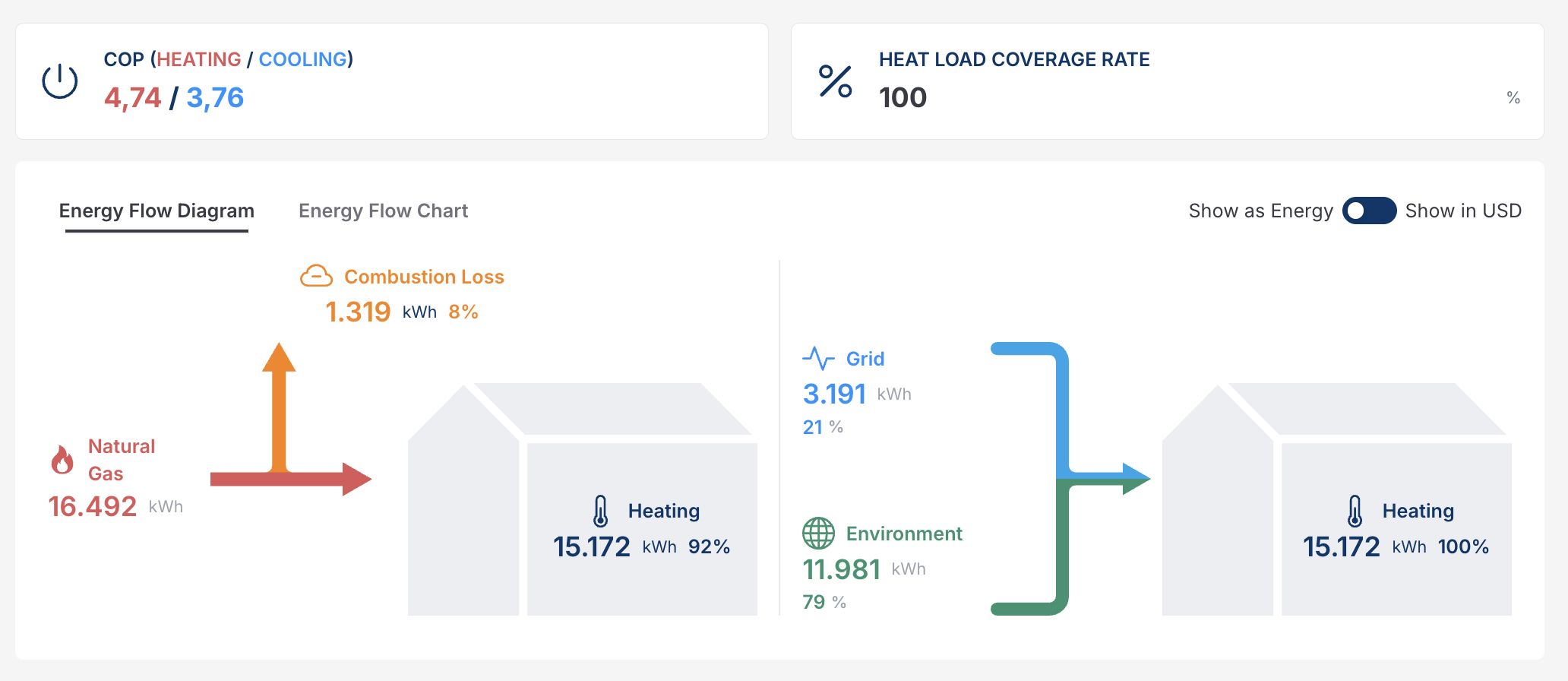
The Energy Flow Diagram compares **existing heating systems** with the **heat pump solution** by showing how energy moves through the system.
#### COP (Heating / Cooling)
**COP (Coefficient of Performance)** indicates how efficiently the heat pump converts electrical energy into useful heating or cooling.
This value differs from standard test condition COPs and represents the annual average COP calculated based on the project location’s hourly outdoor temperature data and selected heat pump’s performance parameters.
* **Heating COP**
Indicates the average efficiency of the heat pump while operating in heating mode over the course of the year.
For every 1 kWh of electricity consumed for heating, the system delivers the stated amount of **useful heat energy** to the building.
* **Cooling COP**
Indicates the average efficiency of the heat pump while operating in cooling mode over the year.
For every 1 kWh of electricity consumed for cooling, the system delivers the stated amount of **cooling energy** to the building.
Higher COP values indicate better overall system efficiency and lower operating costs across both heating and cooling operations.
#### Heat Load Coverage Rate (%)
Shows how much of the building’s total heating demand is covered by the selected heat pump system.
* **100%** means the heat pump fully meets the heating demand without auxiliary systems.
* Lower values indicate partial coverage, typically supported by an additional heating source.
The Energy Flow Diagram compares **existing heating systems** with the **heat pump solution** by showing how energy moves through the system.
**Left Side – Existing System (Example: Natural Gas)**
* **Natural Gas Input (e.g., 16,492 kWh)**
Represents the total fuel energy consumed by the existing situation.
* **Combustion Loss (e.g., 1,319 kWh – 8%)**
Energyis lost during combustion and exhaust processes.
* **Useful Heating Output (e.g., 15,172 kWh – 92%)**
Actual heat delivered to the building after losses.
This highlights inefficiencies inherent in combustion-based systems.
**Right Side – Heat Pump System**
The same heating demand is met using two energy sources:
* **Grid Electricity (e.g., 3,191 kWh – 21%)**
Electrical energy is consumed by the heat pump compressor and additional components.
* **Environmental Energy (e.g., 11,981 kWh – 79%)**
Renewable heat is extracted from the air, ground, or water.
* **Delivered Heating (15,172 kWh – 100%)**
Total useful heat supplied to the building, matching the heating demand.
This demonstrates how heat pumps leverage renewable environmental energy to achieve high efficiency.
**Show as Energy / Show in Currency**
You can switch the visualization between:
* **Energy view (kWh)** – Shows physical energy flows and efficiency
* **Cost view (Currency)** – Converts energy values into operating costs based on defined energy prices
This allows both technical and financial evaluation of system performance.
> Together, these provide a transparent explanation of:
>
> * Where energy comes from
> * How much is lost or recovered
### Energy Flow Chart
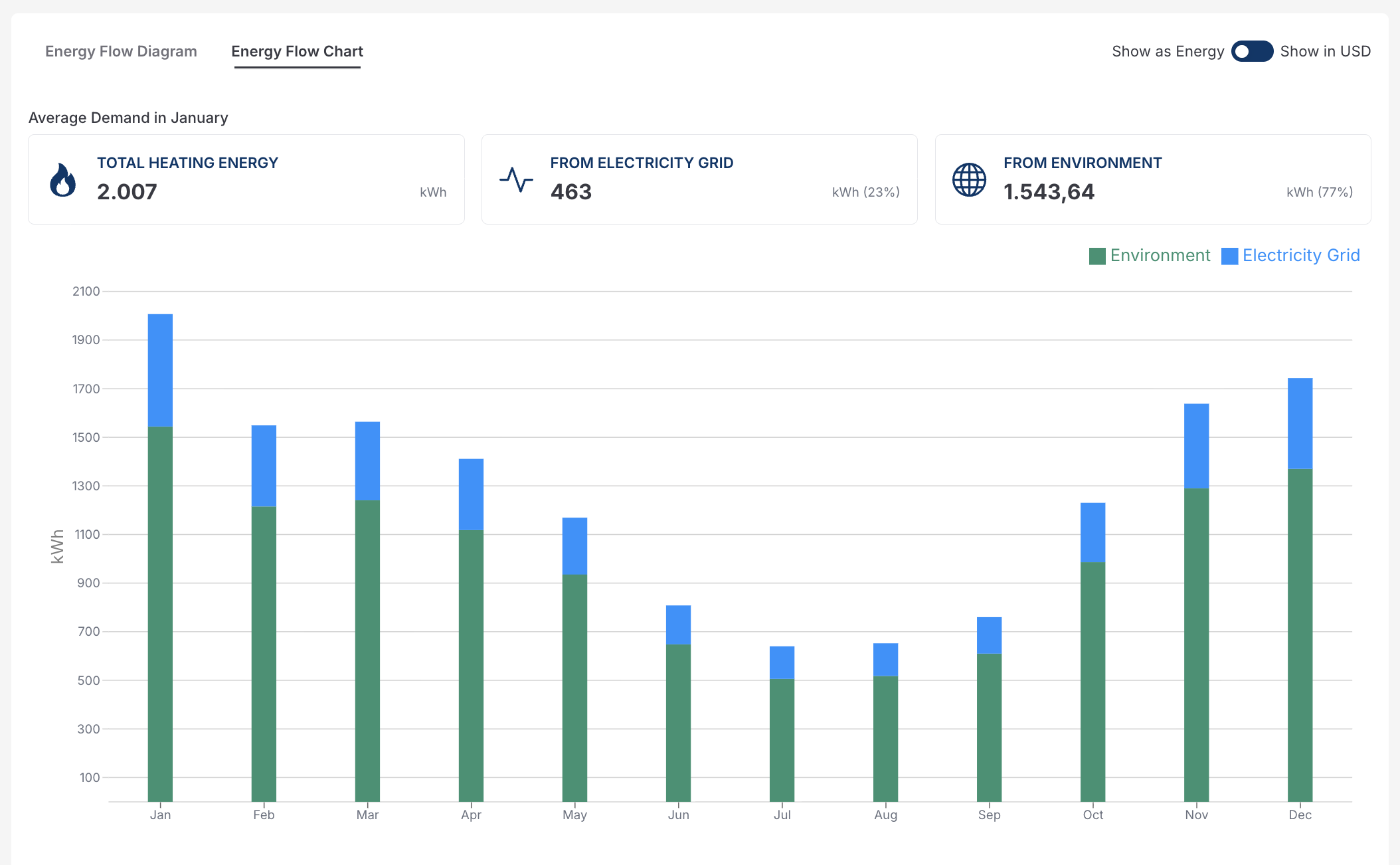
The **Energy Flow Chart** provides a month-by-month view of how the building’s heating demand is supplied by the heat pump system. It breaks total heating energy into its contributing sources and helps visualize seasonal variations.
#### Average Demand in Selected Month
At the top of the chart, a summary shows the energy balance for the selected month:
* **Total Heating Energy**
Represents the total heating demand of the building for that month.
* **From Electricity Grid**
The portion of energy supplied by grid electricity to operate the heat pump (e.g., 463 kWh – 23%).
* **From Environment**
The renewable energy extracted from the environment (air, ground, or water) by the heat pump (e.g., 1,543 kWh – 77%).
This highlights how most of the heating demand is covered by renewable environmental energy rather than electricity consumption.
#### Monthly Bar Chart Explanation
Each vertical bar represents one month of the year and shows:
* **Green section – Environment**
Heat is captured from the environment.
* **Blue section – Electricity Grid**
Electrical energy is consumed by the heat pump.
The combined height of each bar equals the **total heating energy demand** for that month.
**Seasonal Behavior**
* **Winter months** show higher total demand due to colder outdoor temperatures, with increased energy taken from the environment and higher electricity usage.
* **Spring and Autumn months** show reduced demand and lower electricity consumption.
* **Summer months** show minimal heating demand.
This seasonal visualization helps assess system sizing accuracy and expected operational behavior throughout the year.
> These seasonal behavior values are location-dependent and may vary, with cooling being higher in warmer climates.
**Energy vs. Cost View**
Using the toggle, the chart can be displayed as:
* **Energy (kWh)** – Focuses on physical energy flows and system efficiency
* **Cost (Currency)** – Converts monthly energy values into operating costs based on defined electricity prices
By combining performance metrics with visuals, this section helps users confidently understand system behavior, validate recommendations, and clearly communicate the value of heat pump solutions to stakeholders.
***
## Related Pages
* [Energy Consumption Page](/project-design/create-a-project/consumption/energy-consumption.md)
If you encounter any issues, [feel free to contact us.](https://www.solarvis.co/en/company/contact)
---
# Agent Instructions
This documentation is published with GitBook. GitBook is the documentation platform designed so that both humans and AI agents can read, navigate, and reason over technical content effectively. Learn more at gitbook.com.
## Querying This Documentation
If you need additional information that is not directly available in this page, you can query the documentation dynamically by asking a question.
Perform an HTTP GET request on the current page URL with the `ask` query parameter, and the optional `goal` query parameter:
```
GET https://docs.solarvis.co/project-design/create-a-project/heat-pump.md?ask=&goal=
```
`ask` is the immediate question: it should be specific, self-contained, and written in natural language.
`goal` is optional and describes the broader end goal you are ultimately trying to accomplish on behalf of the user. GitBook uses it to tailor the answer towards what is most useful for that goal.
The response will contain a direct answer to the question and relevant excerpts and sources from the documentation.
Use this mechanism when the answer is not explicitly present in the current page, you need clarification or additional context, or you want to retrieve related documentation sections.